
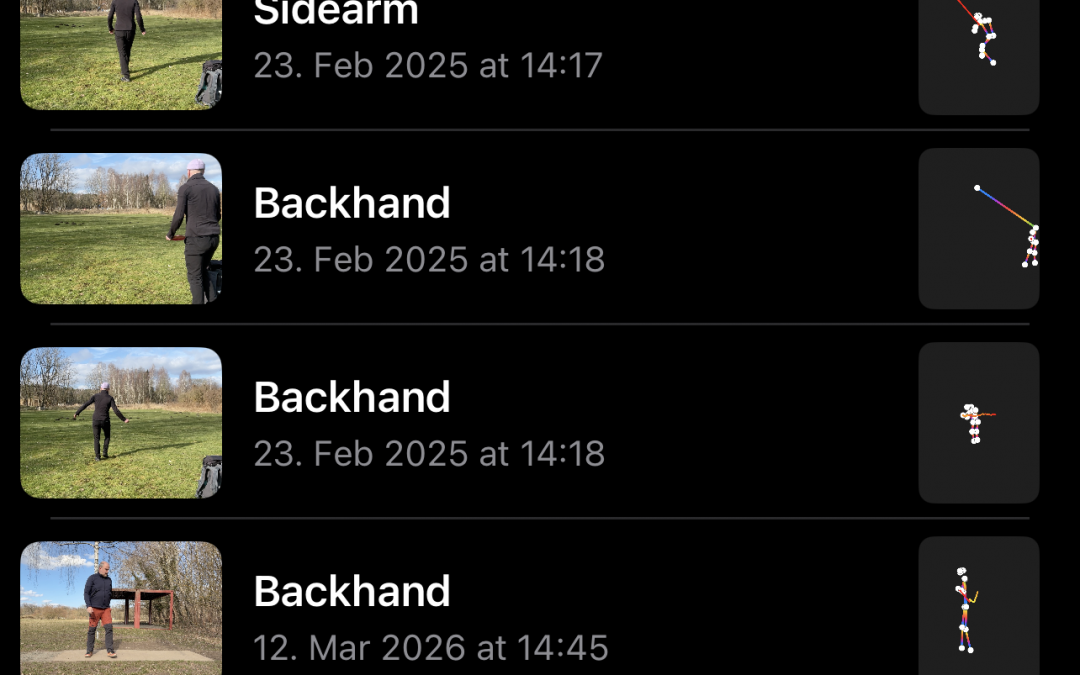
If you’ve been using the Disc Golf Drive Analyzer app to fine-tune your throwing technique, you’re going to want to hear about what’s coming next. The machine learning-powered app, which has quietly become a go-to tool for players looking to break down their drives frame by frame, is about to receive its most significant update yet. From a refreshed interface to powerful new features, here’s everything you need to know about the changes headed your way.
Major UI Overhaul Hits the Disc Golf Drive Analyzer
The Disc Golf Drive Analyzer is rolling out a substantial user interface redesign that should make the entire experience feel more polished and intuitive. For an app that relies on users uploading and reviewing video footage of their throws, a clean and responsive UI isn’t just a nice-to-have — it’s essential. The updated layout streamlines navigation and makes it easier than ever to jump between your recorded drives and the app’s analysis tools.
One of the most welcome changes in this update is the removal of the short clip limitation that has frustrated users since the app’s early days. Previously, you had just a few seconds before and after the throw, which often meant losing valuable context around your throw. Now, you can create longer clips and giving you a fuller picture of your form from approach to follow-through.
Beyond the clip length fix, the overall feel of the app has been tightened up. Menus are more logically organized, loading times appear to have improved, and the general flow from recording to analysis feels less clunky. It’s clear the development team listened to community feedback on this one. For players who gave up on the app due to its earlier quirks, this overhaul is a strong reason to give it another shot.
Longer Clips and Pose Export Are Finally Here
The ability to work with longer video clips is a game-changer on its own, but the update doesn’t stop there. A brand-new pose export feature lets you save and share clips that include the body pose wireframe overlay — the skeletal outline that the app’s machine learning model generates to map your body mechanics during a throw. This means you can now export a visual breakdown of your form and review it outside the app, share it with a coach, or post it to your favorite disc golf community for feedback.
On top of the wireframe overlay, exported clips can also display the path of your throwing hand throughout the motion. This is incredibly useful for identifying inconsistencies in your reach-back, pull-through, and release point. Seeing the hand path drawn out over your actual footage makes it much easier to spot where things go off track compared to staring at raw video alone. It’s the kind of detail that separates casual self-review from genuinely productive practice.
Together, these export features transform the app from a private analysis tool into something far more shareable and collaborative. Imagine dropping an exported clip into a Discord server or a Reddit thread and getting targeted advice based on your actual pose data — not just someone’s best guess from a shaky phone video. For coaches working with multiple players, it’s equally powerful: a quick export gives them a detailed visual reference without needing to sit side by side with the app open.
This update represents a meaningful step forward for the Disc Golf Drive Analyzer, addressing long-standing user complaints while introducing features that genuinely expand what the app can do. The combination of longer clip support, a cleaner interface, and the ability to export pose wireframes and hand path data makes it a far more complete tool for anyone serious about improving their game. Whether you’re a casual weekend player or grinding to shave strokes off your round, this is an update worth downloading the moment it drops.